SkylandersNFC
Runes (NefariousTechSupport)
A Skylanders dumps GUI editor.
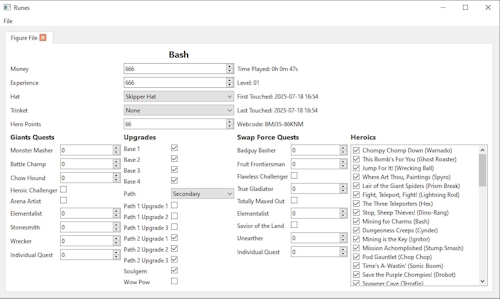
- Download the latest version of the ZIP archive from here.
- Extract the archive wherever you like.
- Download the
salt.txtfile from here.- If you can’t find the download button, pressing
Ctrl+Shift+Swill do the trick.
- If you can’t find the download button, pressing
- Assuming you’ve extracted the Runes ZIP archive to a folder called
Runes-win64-vX.X.X, navigate into it, then into theResourcessubfolder, and place thesalt.txtfile there. - Start
Runes.exe, go to theFilemenu, and clickOpen.- You can also use the shortcut
Ctrl+O.
- You can also use the shortcut
- Select your Skylanders dump file.
- If you don’t have any dumps, check out the Ultimate NFC Pack.
- Follow the GUI menu - everything is pretty self-explanatory.
- When finished, go to the
Filemenu again and chooseSave.- Or just press
Ctrl+S.
- Or just press
- To save your modified dump, give it a new name.
- For example, if you were editing
Bash.dump, you might name the modified versionBash_Enhanced.dump- or whatever you prefer.
- For example, if you were editing
- That’s it!
- Write the modified dump to your NFC tag or use it directly in an emulator.